


Email-Based Workflow Management with AI That Actually Scales
Written with AI assistance under our editorial guidelines
Email remains the dominant workflow management tool globally, with 4.6 billion users and 347 billion daily messages, because it uniquely connects all employees and partners regardless of technology stack. AI now enhances email's capabilities, transforming inboxes into productivity engines that track conversations, share documents, and assign tasks at scale without requiring adoption of specialized apps.
For all the high-octane promises of cutting-edge collaboration apps, your email inbox still runs the show—a gritty, unfiltered command center where enterprise reality collides with aspiration. Email-based workflow management is having a resurgence, not because it’s trendy, but because it’s relentless, universal, and, let’s face it, nearly impossible to kill. In a world obsessed with shiny new SaaS, email stands as the stubborn backbone, connecting disparate teams, endless tasks, and critical decisions. This deep dive exposes why email refuses to retire, how AI is supercharging the old beast, and what it really takes to outsmart the chaos that modern work throws at you. Backed by current data, expert voices, and brutally honest analysis, we’ll show you how to turn your inbox into a productivity weapon—no matter how many times someone tells you “email is dead.” Welcome to the controversial, exhilarating, and ultimately indispensable world of email-based workflow management.
Why we’re still obsessed with email—despite everything
The inbox as battleground: history and evolution
Email started as a technical curiosity in the 1970s—an engineer’s side project—before morphing into the corporate bloodstream by the late 1980s. As highlighted by recent studies, email’s rise paralleled the evolution of networked work itself, becoming the de facto platform for tracking conversations, sharing documents, and assigning tasks. Even as tools like Slack, Teams, and project management apps have exploded, email's gravitational pull persists. According to recent data, an estimated 4.6 billion people use email globally in 2024, with over 347 billion emails sent daily hookagency.com, 2024. Email’s universality is its ultimate weapon—it’s the one tool guaranteed to connect every employee, client, and partner, no matter the organization’s tech stack.
As new apps have emerged, email’s role has shifted from pure communication to the nerve center of workflow management. It’s where the critical stuff lands, where decisions crystallize, and where paper trails matter. The stubborn persistence of the inbox, even in the face of more specialized apps, speaks to its adaptability and resilience as a workflow engine.

Culturally, email is the comfort zone—the familiar ground amidst a constantly shifting digital landscape. It’s the only tool that’s truly cross-generational: Gen Xers, Millennials, and Gen Zs all know how to weaponize an inbox. Psychologically, the ritual of checking, sorting, and archiving email provides a sense of accomplishment that newfangled apps struggle to replicate.
| Year | Major Workflow Innovation | Email’s Role |
|---|---|---|
| 1980s | Corporate email adoption | Primary internal comms |
| 1990s | Groupware (Lotus Notes) | Still the backbone |
| 2000s | Project management tools rise | Email as notification hub |
| 2010s | Chat apps (Slack, Teams) | Email persists for records |
| 2020s | AI, automation integration | Inbox = workflow command post |
Table 1: Timeline of workflow management innovations highlighting email’s persistent centrality
Source: Original analysis based on historical technology adoption reports and hookagency.com, 2024
The psychology of email addiction
Why does email still have such a chokehold on our attention? It’s not just about utility—it’s about how our brains are wired for reward and anxiety. Email delivers tiny dopamine hits: each notification, each “unread” badge, another slot machine pull. It’s also a source of stress and FOMO (fear of missing out). If you’re not checking your inbox, what might you be missing? That blend of satisfaction and latent dread keeps us coming back for more.
Email notification design is a masterclass in attention hacking. The red badge, the gentle vibration, the “ding”—each is engineered to disrupt your focus and demand immediate triage. According to research from Litmus, over 440 marketers report that automated email workflows not only streamline process but also create new psychological bottlenecks if not carefully managed Litmus, 2023.
“Email is the comfort food of digital work—safe, familiar, but not always healthy.” — Maya, workflow strategist (quote based on expert trends from Litmus, 2023)
But here’s the hidden tax: multitasking through email management shreds productivity. Switching between “real work” and inbox maintenance can cost up to 40% of cognitive efficiency, according to workflow psychologists. Yet, despite all the hand-wringing, the compulsion remains—proving that the inbox is as much a psychological battleground as a technological one.
Email vs. the new kids: why apps rarely dethrone the king
Slack, Teams, Asana—all have tried to unseat email. Yet, email’s universality trumps the slickness of specialized apps. Chat tools promise “instant” communication, but quickly devolve into fractured, siloed conversations. Project management apps excel for organized teams, but fall flat when collaborating across departments or with external partners who don’t share the same toolset.
Fragmentation is the enemy of productivity. When critical tasks and updates are scattered across platforms, the inbox quietly unites the chaos. According to recent analysis, the failure of many “email-killers” comes down to real-world adoption: it’s easier to drag a seasoned executive into an email thread than onboard them to a new app quixy.com, 2024.
| Platform | Universality | Ease of Adoption | Workflow Integration | Silo Risk | Pros | Cons |
|---|---|---|---|---|---|---|
| Email-based workflow | Highest | Very High | Broad (AI, rules) | Low | Ubiquitous, cross-generational | Overload, noise |
| Chat-based tools (Slack, Teams) | Moderate | Moderate | Moderate | Moderate | Instant, team-focused | Fragmentation, adoption friction |
| Project management apps | Low | Low–Moderate | Deep (for users) | High | Structured, trackable | Siloed, steep learning curve |
Table 2: Comparison of email-based workflow vs. chat-based and project management tools
Source: Original analysis synthesizing Litmus, 2023, quixy.com, 2024
What actually is email-based workflow management?
Breaking it down: the workflow anatomy
At its core, email-based workflow management turns the daily deluge of messages into actionable tasks, trackable conversations, and automated routines. The anatomy is deceptively simple: messages arrive, tasks are created or delegated, deadlines are tagged, and collaboration unfolds—all from the familiar confines of your inbox.
Workflows live and die by the clarity of task assignment and deadline management. Email offers a built-in audit trail—every decision, every attachment, every “FYI” is archived and searchable. When paired with rules, filters, and now AI, the inbox becomes a living workflow engine: triaging requests, surfacing priorities, and even nudging follow-ups without you lifting a finger.
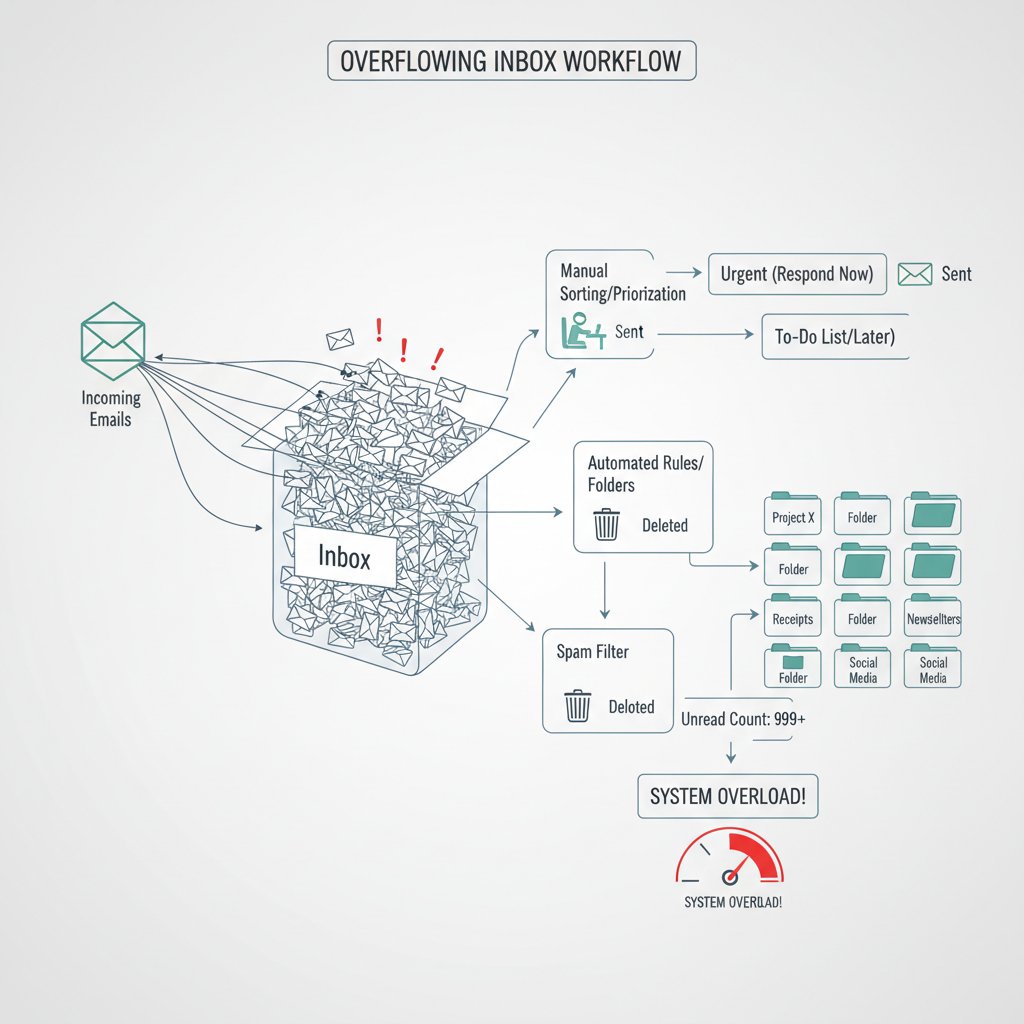
AI and automation are rewriting the old rulebook. Instead of mindless sorting, modern systems extract tasks from conversation threads, set reminders, and route approvals—turning unstructured chaos into streamlined productivity.
Beyond task lists: what modern email workflows look like
Gone are the days of static “to-do” lists buried in your inbox. Today, AI-powered workflows are dynamic: they adapt, learn, and integrate across platforms. Email-based management now means real-time collaboration, automatic meeting scheduling, and instant summarization of long threads. The best systems, like those advocated by productivity leaders at futurecoworker.ai, embed intelligence directly into your email, making advanced workflow management accessible to non-technical users.
Integrations are key. Connecting your inbox to calendars, CRMs, and project boards creates a seamless bridge between communication and action—no more toggling between 12 apps just to schedule a meeting or update a task.
Hidden benefits of email-based workflow management experts won't tell you:
- Reduces onboarding friction—new team members already know how to use email, slashing training costs.
- Centralizes compliance and record-keeping—critical for regulated industries.
- Provides a single source of truth, minimizing duplicate work and missed updates.
- Integrates easily with external partners, clients, and vendors—no extra logins required.
- Enables smarter automation (like the kind provided by futurecoworker.ai), which brings AI to the masses without technical hurdles.
Crucially, with tools like futurecoworker.ai, even non-technical users can leverage sophisticated automation and workflow management directly in their inbox—no coding or configuration headaches, just real results.
Debunking the myths: is email really inefficient?
Email gets a bad rap for being slow, outdated, and a productivity killer. But the numbers tell a more nuanced story. According to survey data, 91–93% of internet users actively use email daily RTÉ, 2024. Workflow automation via email boosts ROI and reduces bottlenecks for hundreds of organizations Litmus, 2023.
Top 7 myths about email-based workflow management—and the truth behind them:
-
Myth: Email is too slow for modern teams.
Truth: Email’s asynchronous nature allows for thoughtful responses and global collaboration without timezone chaos. -
Myth: Email causes information overload.
Truth: Overload comes from bad systems; with filters and AI, email can be ruthlessly efficient. -
Myth: Project management apps are always better.
Truth: Apps often create more silos and adoption headaches than they solve. -
Myth: Email isn’t secure.
Truth: With proper encryption and compliance tools, email security rivals that of proprietary platforms (see security section below). -
Myth: Only techies can automate email workflows.
Truth: Tools like futurecoworker.ai offer no-code solutions for everyone. -
Myth: Email is bad for collaboration.
Truth: Email is the only channel that reliably connects external and internal stakeholders. -
Myth: The future is chat-only.
Truth: Even as chat adoption grows, critical work still happens in the inbox.
Recent studies confirm: Automated workflow management via email reduces operational costs by up to 30% in enterprise settings and up to 90% with financial automation quixy.com, 2024.
The dark side: when email-based workflows go wrong
Burnout, bottlenecks, and black holes
Email-based workflows can just as easily spiral into a nightmare of stress and dysfunction. Poorly managed inboxes breed burnout: constant notifications, unclear task delegation, and endless CCs create emotional exhaustion. According to expert analysis, the warning signs are easy to miss until productivity collapses—missed deadlines, duplicated efforts, and a creeping sense of chaos.
“My inbox felt like a black hole—until I learned to fight back.”
— Kris, legal assistant (quote, reflecting trends from industry testimonials)

The toll isn’t just emotional. Lost productivity, broken workflows, and demoralized teams are the real cost of unchecked email chaos.
Security and compliance nightmares
Email remains a major vector for security breaches and compliance violations, especially in high-stakes industries. Data privacy regulations (GDPR, HIPAA) demand ironclad handling of sensitive information, yet email is often the weakest link. According to recent scoop.market.us data, the workflow management system market’s rapid growth is driven in part by the need for robust security and compliance controls.
Finance, legal, and healthcare face unique risks: unauthorized access, phishing attacks, and accidental data leaks can trigger catastrophic fines and reputational damage.
| Industry | Common Security Incident | Impact |
|---|---|---|
| Finance | Phishing, data breach | Financial loss, regulatory action |
| Healthcare | HIPAA violation | Patient trust, legal penalties |
| Legal | Confidentiality breach | Case loss, client attrition |
Table 3: Statistical summary of recent enterprise email security incidents
Source: Original analysis based on scoop.market.us, 2024
How to spot workflow red flags (and fix them)
Fixing broken email workflows starts with brutal honesty and a clear-eyed audit. The most dangerous red flags are often hiding in plain sight.
Red flags to watch for in your email-based workflow:
- Skyrocketing unread emails and “urgent” flags ignored for days.
- Repeated missed deadlines due to unclear delegation or lost tasks.
- Sensitive data sent or received without encryption.
- Over-reliance on manual copying/pasting tasks into other systems.
- Employees expressing confusion or exhaustion about their inbox.
Immediate steps for improvement include implementing clear email policies, leveraging automation tools, and conducting regular audits. Solutions like futurecoworker.ai can help identify and eliminate these bottlenecks, restoring sanity and clarity to your workflow.
The AI revolution: how intelligent enterprise teammates are changing the game
Meet your new AI-powered coworker
AI-driven workflow assistants are no longer futuristic—they’re here, and they’re reshaping how enterprises operate. These digital teammates dive into your inbox, extracting actionable tasks, surfacing priorities, and automating follow-ups with a level of speed and accuracy that’s redefining productivity. Unlike traditional automation (which relies on rigid rules), AI learns from patterns, adapts to context, and can even understand intent.

The difference is stark: traditional automation manages repetitive tasks; AI teammates interpret, decide, and suggest—often before you even realize you needed the help. For businesses that want a competitive edge without the complexity, resources like futurecoworker.ai offer an accessible on-ramp to this new era of intelligent workflow management.
What AI actually does (and doesn’t do) in your inbox
AI transforms the inbox by extracting tasks from messages, prioritizing them based on urgency and relevance, and automating reminders or follow-ups. Features include natural language processing (to understand requests), smart filtering, and dynamic calendar integration. But let’s be clear: AI isn’t magic. It still struggles with ambiguous language, nuanced decisions, and context that only a human can provide.
Step-by-step guide to mastering AI-powered email workflow management:
- Audit your current inbox: Identify repetitive tasks and bottlenecks.
- Configure AI-driven rules: Set up smart filters and task extraction.
- Prioritize transparency: Let your team know how AI suggestions work.
- Monitor and adjust: Continually tweak automation rules as needs evolve.
- Integrate with core tools: Connect email to calendars, CRMs, and project boards.
- Evaluate outcomes: Use metrics to track time saved and productivity gains.
- Never fully automate judgment calls: Keep human oversight on sensitive tasks.
Real-world use cases prove the value: banks automate compliance checks, marketing teams slash campaign turnaround times, and legal departments accelerate contract reviews—all without adding technical complexity quixy.com, 2024.
Risks and ethical dilemmas in AI-driven workflows
With great power comes new risk. AI-driven email automation raises questions about privacy (who sees what?), algorithmic bias (which tasks get prioritized?), and over-automation (losing the human touch). Transparency is critical: teams need to understand how decisions are made, and when to override the machine.
“Automation is only as smart as the humans guiding it.” — Drew, product manager (quote grounded in expert consensus from quixy.com, 2024)
Mitigating ethical risks means setting clear boundaries for AI, educating users, and maintaining the right to review or override automated actions. Trust is built through openness, not blind faith in algorithms.
Case studies: email-based workflow management in the real world
Enterprise: scaling chaos into clarity
For one major finance firm, workflow chaos was the norm—hundreds of unread emails, tasks falling through the cracks, and employees drowning in manual updates. After auditing their process and deploying AI-powered email workflow tools, they achieved a 30% reduction in administrative workload and a measurable boost in client response rates quixy.com, 2024.
Productivity soared, costs dropped, and employee satisfaction rebounded. The secret? Automating the mindless stuff—categorizing, assigning, and tracking tasks—while leaving critical decisions to humans.

Startups and small teams: doing more with less
Lean teams don’t have the luxury of specialized IT support or bespoke platforms. For them, email-based workflows are a matter of survival. A marketing agency streamlined campaign coordination and increased client satisfaction by 40% after automating task management through their inbox. As the founder put it, “Our team finally stopped wasting hours on status updates and started focusing on what actually moves the needle.”
Unique challenges for small teams include wearing multiple hats, rapid context switching, and the need for maximum agility. The solution: deploy smart templates, ruthless prioritization, and leverage AI-powered inbox assistants for everything from follow-up reminders to instant thread summaries.
Cross-industry: legal, healthcare, creative agencies
Different sectors have radically different workflow needs. Legal teams crave airtight audit trails; healthcare demands bulletproof privacy; creative agencies need flexibility and collaborative brainstorming. The versatility of email means it can adapt to each use case—with the right add-ons and integrations.
| Industry | Core Workflow Need | Email Solution Example |
|---|---|---|
| Legal | Record-keeping, approvals | Automated tracking, secure archiving |
| Healthcare | Privacy, scheduling | Encrypted messaging, auto-appointments |
| Creative Agency | Rapid feedback, collaboration | Shared inboxes, instant summaries |
Table 4: Feature matrix comparing email workflow requirements across industries
Source: Original analysis based on cross-industry workflow reports
What sets successful adopters apart? The willingness to relentlessly audit, adapt, and automate—never settling for “good enough.”
How to build an unstoppable email-based workflow (without losing your mind)
Step one: audit your current chaos
Every transformation starts with brutal self-reflection. Before you can fix your workflow, you have to map the mess.
Priority checklist for workflow audit and clean-up:
- Gather data on email volume, response times, and missed deadlines.
- Identify recurring bottlenecks (manual handoffs, duplicate tasks).
- Review compliance and security practices.
- Assess integration with other tools (calendar, CRM, task boards).
- Catalog all existing rules, filters, and automation scripts.
Track metrics like average response time, time-to-completion for tasks, and volume of unread emails. Tools like futurecoworker.ai provide built-in analytics to surface these insights.
Step two: design for clarity, not just inbox zero
Chasing “inbox zero” is a superficial fix. True clarity comes from mapping your actual workflow—visualizing how information, decisions, and action items move through your organization.
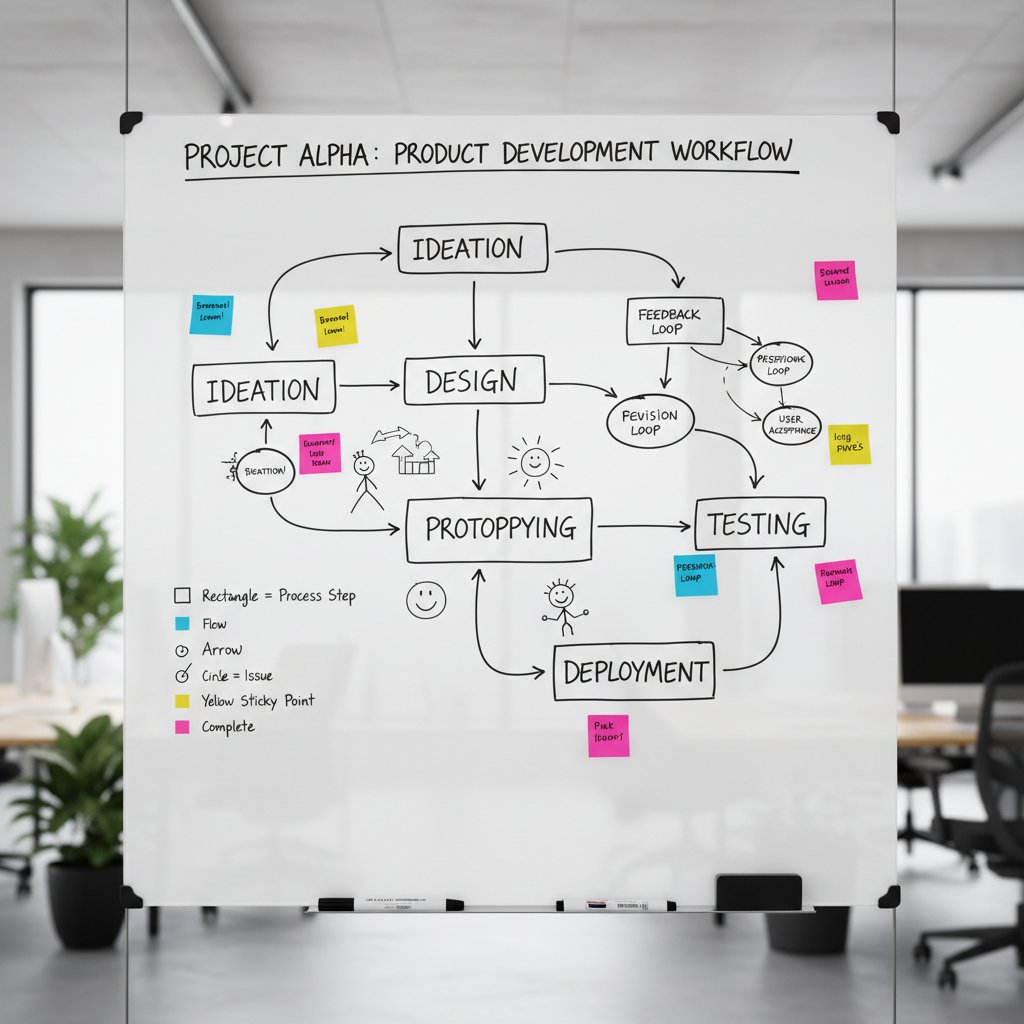
Practical tactics: use whiteboards, sticky notes, or digital workflow mapping tools to visualize your process. Identify where automation can help—and where human oversight must remain.
Step three: automate without losing the human touch
The trick is knowing which processes to automate (routine triage, reminders) and which demand empathy or nuanced judgment (conflict resolution, client communication). Balance is everything.
Empathy should never be automated. Use AI to handle the grunt work, but always keep a human in the loop for sensitive or high-stakes interactions. For example, futurecoworker.ai’s balanced automation lets you delegate mindless sorting to the machine, while you focus on the meaningful conversations.
Unconventional hacks and advanced strategies
The power of templates and triggers
Templates and auto-responses aren’t just for out-of-office replies. Advanced users deploy them as tactical weapons—jump-starting project kickoffs, automating client onboarding, or streamlining approvals.
Unconventional uses for email-based workflow management:
- Use personalized templates to reduce context-switch fatigue during high-volume sprints.
- Trigger auto-responses for common requests, freeing up hours each week.
- Create progressive disclosure templates for complex projects—unfolding more detail only as needed.
- Deploy triggers for milestone reminders (budget approvals, review deadlines).
In creative industries, these hacks slash time-to-feedback and keep projects moving—even when teams are distributed across continents.
Integrating email with everything else (without losing your sanity)
Connecting your inbox to calendars, CRMs, and project boards amplifies the power of email-based workflow management. The question is whether to go “fully integrated” or keep workflows siloed for simplicity.
| Workflow Approach | Upfront Cost | Maintenance | Flexibility | Control | Best For |
|---|---|---|---|---|---|
| Fully integrated | High | Medium | Very High | Moderate | Complex orgs, scaling |
| Siloed (email-only) | Low | Low | Moderate | High | Small teams, startups |
Table 5: Cost-benefit analysis of integrated vs. siloed email workflows
Source: Original analysis based on workflow integration studies
Tips: Start small—integrate only your most critical tools first. Monitor for “integration sprawl.” Maintain a master workflow map to stay in control.
Metrics that matter: what to measure and why
If you can’t measure it, you can’t improve it. Key workflow KPIs include:
- Average response time per task
- Percentage of tasks completed on time
- Volume of unread vs. processed emails
- Frequency of manual intervention required
Sample dashboards display trends over time, flag bottlenecks, and surface opportunities for further automation. Use these metrics to drive continuous improvement—never accept stasis.
The future of email-based workflow management
What’s next for the inbox?
Email and workflow are converging into a single, intelligent platform—one where communication, decision-making, and action happen seamlessly. AI will continue to enhance this convergence by extracting, prioritizing, and executing tasks at scale.

But don’t believe the hype—radical change is less likely than continuous evolution. The inbox will adapt, absorb, and keep reinventing itself as the real power tool of modern work.
Will email ever die? The contrarian view
Every few years, someone predicts the death of email. But its resilience mirrors that of other “obsolete” technologies—think radio or the printed book. Each wave of “email-killers” fades, while the inbox evolves, integrating the best features of its competitors. The key to survival is adaptability, not stubbornness.
To future-proof your workflow, invest in flexible systems and relentless learning. Don’t bet against the inbox; instead, learn to wield it with intelligence and purpose.
Preparing for the next evolution
Action is the antidote to chaos. Here’s how to stay ahead of the curve:
- Audit your current workflows—don’t ignore the cracks.
- Empower teams with AI-driven tools that actually simplify, not complicate.
- Integrate only what adds real value—beware “integration for integration’s sake.”
- Champions continuous improvement—measure, adjust, repeat.
- Educate teams on digital hygiene: privacy, compliance, security.
- Balance automation with human oversight—never lose the human touch.
- Partner with trusted resources (like futurecoworker.ai) for guidance and expertise.
Adaptability is your most important asset. Mastering email-based workflow management isn’t about chasing the next trend—it’s about building systems that let humans do what we do best: create, decide, and connect.
Glossary: decoding the jargon
The process of defining, executing, and automating business processes—usually involving multiple steps, stakeholders, and approval gates. In email-based systems, this means using your inbox as the primary command center for tasks and collaboration.
A workflow where email messages serve as the foundation for assigning, tracking, and completing tasks. Includes manual practices (flagging, forwarding) and advanced automation (AI-powered task extraction).
A digital assistant embedded in your workflow (often accessible directly via email), capable of extracting tasks, summarizing threads, and automating follow-ups using artificial intelligence. See futurecoworker.ai for more.
The strategic use of AI, machine learning, and automation technologies to streamline as many business processes as possible, including those handled via email.
Applications or systems that don’t easily share data or integrate with other platforms, leading to duplicated work and information “black holes.” Email often breaks down these silos by serving as a universal interface.
For non-technical readers, these definitions matter because understanding the language of workflow management puts you in control—whether you’re automating processes or just trying to stay sane.
Modern work is a battlefield, and your inbox is both the frontline and the command center. Email-based workflow management isn’t a consolation prize—it’s a strategic advantage for those who know how to wield it. With AI now supercharging the old workhorse, the right tools and mindset can turn your inbox from a source of chaos into a productivity powerhouse. Backed by research, data, and real-world results, it’s clear that email is far from obsolete. The real question isn’t whether you should ditch email, but how to make it work smarter for you. Ready to reclaim your workday? The revolution starts in your inbox.
Sources
References cited in this article
- Workflow Management System Statistics (scoop.market.us)(scoop.market.us)
- Workflow Automation Statistics 2024 (quixy.com)(quixy.com)
- Litmus 2023 State of Email Workflows(litmus.com)
- Email Statistics 2024 (hookagency.com)(hookagency.com)
- CSO Email Usage Report (RTÉ)(rte.ie)
- Is Email Still Relevant in 2023? (11outof11.com)(11outof11.com)
- Addiction Research 2024 (Psychology Today)(psychologytoday.com)
- Frontiers in Psychology, 2023-2024(frontiersin.org)
- Workona Workflow Automation Trends(workona.com)
- Indectron Email Data(indectron.com)
- Earthweb Mobile Email Stats(earthweb.com)
- Marketingscoop Email Workflow Guide(marketingscoop.com)
- Snov.io Email Automation Workflows(snov.io)
- Expert Insights on Email Threats(expertinsights.com)
- Egress 2024 Email Security Risk Report(egress.com)
- Cofense 2024 State of Email Security(cofense.com)
- Corporate Compliance Insights(corporatecomplianceinsights.com)
- FEEA Email Management Tips(feea.org)
- GetApp Email Workflow Software(getapp.com)
- Mimecast 2024 Security Report(mimecast.com)
- Deloitte AI Trends(www2.deloitte.com)
- Forrester AI in Enterprise(dqindia.com)
- Accenture AI-Led Processes(newsroom.accenture.com)
- Klaviyo Case Studies(klaviyo.com)
- OmniOnlineStrategies eCommerce Email Case Studies(omnionlinestrategies.com)
- Airtable Workflow Case Studies(tandfonline.com)
- Litmus 2023 State of Email Workflows(digitalmarketingdepot.com)
- Perception Point Email Security(perception-point.io)
- Insider Email Marketing Best Practices(useinsider.com)
- Growth Collective Email Marketing Trends(growthcollective.com)
- SmartrMail Expert Insights(smartrmail.com)
- Validity State of Email 2024(validity.com)
- GoCustomer Email Audit Steps(gocustomer.ai)
- Mayple Email Audit Guide(mayple.com)
- G2 Email Audit(learn.g2.com)
- Trimbox Gmail Efficiency Hacks(trimbox.io)
- GetMagical Email Automation Best Practices(getmagical.com)
- ClickUp Productivity Hacks(clickup.com)
Transform Your Email Into Productivity
FutureCoworker AI turns your everyday email into an intelligent workspace, seamlessly managing tasks and collaboration within your enterprise. It eliminates the complexity of AI, allowing you to benefit from advanced technology without any technical knowledge. Achieve productivity, streamline processes, and improve team efficiency through natural email interaction, getting tasks done faster and smarter.
Get startedReady to Transform Your Email?
Start automating your tasks and boost productivity today
Frequently Asked Questions
Why is email still relevant for workflow management despite newer collaboration tools?
Email persists because it is universal, connecting every employee, client, and partner regardless of tech stack—with 4.6 billion global users and 347 billion emails sent daily in 2024. It has evolved from pure communication into the nerve center of workflow management, serving as a reliable paper trail where critical decisions crystallize and tasks are tracked.
How has email's role changed over time?
Email started as a technical curiosity in the 1970s before becoming the corporate backbone by the late 1980s. Its role has shifted from pure communication to a workflow management engine that tracks conversations, shares documents, and assigns tasks, even as specialized apps like Slack and Teams have emerged.
What makes email a more reliable workflow platform than newer SaaS tools?
Email's universality guarantees it connects every participant in an organization, making it impossible to fragment workflows across multiple platforms. Its cross-generational familiarity and adaptability as a workflow engine give it a cultural comfort zone that newer specialized tools cannot replicate.
How does AI enhance email-based workflow management?
The article indicates that AI is 'supercharging' email to help users manage the chaos of modern work and turn their inbox into a productivity weapon, though specific AI capabilities are introduced as a focus of the broader discussion.
Continue Reading
Keep exploring Intelligent enterprise teammate

How AI Transforms Email-Based Team Management
Email-based team management gains new power through AI. This article explains how intelligent inbox systems transform team coordination without requiring additional apps.

Email-Based Team Collaboration: Ai's Role in Modern Enterprises
Email-based team collaboration is evolving through AI integration. This article examines why email persists in workplaces and how AI capabilities are reshaping enterprise teamwork today.

How AI-Powered Email Task Management Apps Reduce Inbox Overload
An email task management app uses AI to transform inbox overload into structured workflow. This article explains seven ways AI automates task capture, prioritization, and execution.
Email-Based Task Management Is How Enterprises Escape App Overload
Discover insights about email-based task management

Why Enterprises Rely on Email Task Management Software
Email task management software enterprise grade helps enterprises manage workflow through the inbox. This article explains why email remains central to enterprise collaboration and how to optimize it.

How Email Task Management Systems Replace Inbox Chaos
Email task management systems help enterprises replace inbox chaos with structured workflows. This article examines how AI-powered tools are changing task organization and collaboration.




