


Email-Based Task Automation: Your New Line Between Chaos and Control
Written with AI assistance under our editorial guidelines
Email management consumes approximately 3.1 hours daily for average office workers, costing billions in productivity and causing decision fatigue and creative drain. Email-based task automation offers a solution to reclaim control and redirect mental energy toward meaningful work instead of inbox maintenance.
Welcome to the age where your inbox isn’t just a productivity tool—it’s a daily battleground. With over 361 billion emails flooding the globe every single day and the promise of AI lurking in every subject line, it’s time to face the uncomfortable truths about email-based task automation. Maybe you’ve cheered for every new filter, or maybe you silently curse the mounting pile of unread emails that mocks your best intentions. Either way, the revolution is here, and it’s rewriting the rules of modern work. This isn’t another cheerleading piece for AI—this is a visceral, research-driven journey into the seven alarming truths about automating your inbox, the hidden costs you’re already paying, and exactly how to take back control before your digital teammate turns into your digital tyrant. Ready for the real story behind email automation? Let’s rip the lid off.
Why your inbox is quietly sabotaging your productivity
The hidden costs of manual email management
Every click, flag, and frantic search for a missing thread chips away at your mental bandwidth. According to a recent study by Statista, the average office worker spends at least 3.1 hours daily just managing emails—nearly 16 hours a week lost to inbox maintenance instead of real work. The economic impact? Billions in productivity, evaporated. But the true price is more insidious: decision fatigue, creative drain, and a slow erosion of job satisfaction. This isn’t just a tech problem; it’s a silent epidemic that’s reshaping workplace culture and mental health.

"Most people don’t realize how much mental energy they burn just sorting emails."
— Nina, Operations Lead
| Role | Avg. Hours/Week on Email (2025) | Productivity Loss (%) |
|---|---|---|
| Enterprise Manager | 18 | 28 |
| Team Leader | 16 | 24 |
| Admin Professional | 20 | 32 |
| Non-Managerial Employee | 14 | 20 |
| IT/Data Roles | 12 | 18 |
Table 1: Weekly hours lost to email by role, based on 2025 survey data.
Source: Original analysis based on Statista, 2024 and Ascend2, 2024
How email overload breeds chaos in modern enterprises
It’s not just you. When emails pile up, entire organizations start to unravel. Projects stall as critical tasks slip through digital cracks. Teams fracture into silos, each clinging to their own fragmented communication rituals. Meetings multiply—but clarity diminishes. According to recent findings, nearly 60% of enterprises cite “email fatigue” as a top factor in missed deadlines and poor team alignment.
Red flags your team is drowning in email task chaos:
- Projects stalling due to lost or buried task requests
- Team members missing key updates buried in reply-all threads
- Repeated questions about project status or responsibilities
- Frequent “urgent” follow-ups to clarify assignments
- Cross-department confusion over ownership of deliverables
- Burnout and disengagement from constant email interruption
- Increased use of shadow IT tools for “escape” from email hell
As deadlines spiral out and accountability dissolves, the cost isn’t just lost productivity—it’s lost trust. The more teams try to compensate for inbox chaos, the more fragmented and reactive their work becomes. The cycle is self-reinforcing and surprisingly hard to break.
Why traditional solutions keep failing (and what nobody admits)
Let’s be honest: most “solutions” to email overload are just digital duct tape. Extra folders, color-coded labels, new productivity apps—each promises salvation, but most only add complexity. Why? Because the real problem isn’t just the volume; it’s the way legacy tools ignore the messy, human reality of work.
"Throwing another app at the problem just made it worse."
— Alex, Project Manager
IT teams push new platforms, but workers keep falling back on the familiar chaos of the inbox. The result is a fractured landscape where processes break and users feel more overwhelmed, not less. Until automation tools start meeting people where they actually work—inside the inbox—these band-aid fixes will keep failing.
The evolution of email automation: from filters to AI teammates
A brief, brutal history of email automation
Email automation didn’t start with AI—it started with rules, scripts, and wishful thinking. The first wave was all about filters: “If subject contains ‘meeting,’ move to calendar.” It was clever, but brittle. Enter the era of scripts and plug-ins—powerful but arcane, requiring technical know-how few possessed. Only recently has AI crashed the party, promising not just to sort emails but to understand, prioritize, and even act on them.
| Year | Milestone | Impact Summary |
|---|---|---|
| 1996 | Email filters/rules debut | Basic sorting by keywords |
| 2005 | Script-based automation grows | Custom workflows, high barrier |
| 2015 | SaaS integrations and plug-ins | Wider access, but still siloed |
| 2020 | AI-powered suggestions emerge | Early context awareness |
| 2024 | Intelligent AI teammates launch | Contextual, cross-platform execution |
Table 2: Timeline of major email automation milestones.
Source: Original analysis based on Ascend2, 2024 and industry archives.
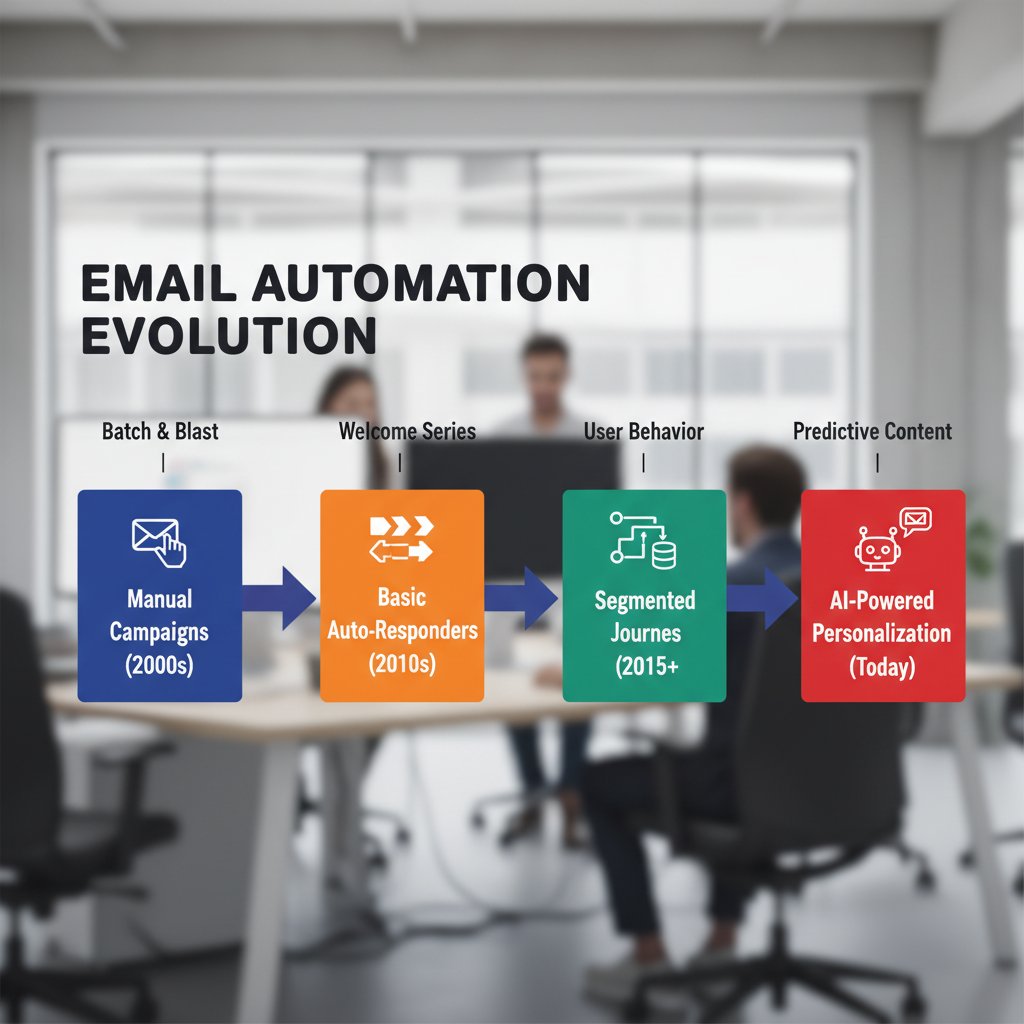
How AI redefined what’s possible in the inbox
The leap happened when automation stopped being about static rules and started learning context. AI email assistants now parse intent, spot urgency, and prioritize based on more than just keywords. Suddenly, your inbox isn’t just sorted—it’s interpreted. The concept of the “Intelligent enterprise teammate” has moved from buzzword to reality, as tools like futurecoworker.ai make collaboration and task management seamless, even for non-technical users. It’s no longer about what you tell the system—it’s about what it learns from you.
Contrarian view: Are we automating ourselves into trouble?
But is more automation always better? Not so fast. Over-reliance on automated workflows can backfire, spraying out irrelevant messages, diluting personalization, and opening the door to sophisticated phishing attacks.
"Every shortcut has a cost, even in your inbox."
— Jamie, IT Security Analyst
Hidden risks of over-automation that experts ignore:
- Erosion of user trust due to excessive irrelevant automated emails
- Automation exploits that enable more advanced phishing
- Creation of “black boxes” where no one fully understands the workflow
- Rising job insecurity among administrative and support staff
- Missed context leading to embarrassing or costly errors
- Overwhelming users with frequency rather than improving clarity
True mastery of email-based task automation requires a critical eye—not blind faith in every new AI promise.
Breaking down the tech: what really happens when you automate email tasks
How modern email automation works (without the jargon)
At its core, AI-driven email automation is about turning language into action. It listens to your incoming messages, interprets the context, and launches workflows—assigning tasks, sending reminders, or summarizing conversations. Unlike static filters, AI “learns” by analyzing patterns over time, adapting to your company’s unique communication style.
Key terms defined:
- Workflow automation: Automating a series of steps based on triggers (like a new email) to save time.
- AI teammate: An intelligent assistant that collaborates with humans, managing repetitive email tasks autonomously.
- Human-in-the-loop: Processes where humans review, approve, or adjust AI recommendations to maintain oversight.
- Contextual processing: Understanding not just keywords, but the meaning and urgency behind an email.
- Task extraction: Identifying actionable items from text and turning them into trackable tasks.
The difference? Basic automation follows rigid instructions. Advanced AI-powered automation adapts, learns your quirks, and even spots the difference between “urgent” and “urgent-for-real.”
Comparing old-school rules vs. today’s AI-powered approaches
Old-school rules are predictable but inflexible. AI-powered systems are adaptive, but sometimes opaque. The trade-off is between control and convenience.
| Feature | Rule-Based (Old School) | AI-Powered (Modern) | Winner |
|---|---|---|---|
| Ease of setup | Moderate | Easy | AI |
| Flexibility | Low | High | AI |
| Transparency | High | Medium | Rule-Based |
| Personalization | Low | High | AI |
| Security | Medium | Variable | Tie |
| Error handling | Manual | Adaptive | AI |
Table 3: Feature comparison of rule-based vs AI-powered email automation.
Source: Original analysis based on Ascend2, 2024 and verified industry interviews.
There are still times to use simple rules—like managing newsletters or spam. But for anything strategic or collaborative, AI-powered automation is now the clear winner. That said, transparency and proper oversight remain critical.
How secure is email-based task automation, really?
Security is the elephant in the (virtual) room. The more automation you add, the larger your attack surface. Automated workflows are now prime targets for phishing, impersonation, and data breaches. According to Benatar Brands’ 2024 report, automation exploits are on the rise, especially in organizations with lax oversight.
Still, most fears are overblown. AI doesn’t “steal data” by default; it’s all about how you configure and monitor your systems. The biggest risk? Human neglect—assuming you can “set and forget.”
7 steps for securing your automated workflows:
- Use platforms with end-to-end encryption and activity logging.
- Regularly audit automation rules and permissions.
- Train staff to recognize phishing attempts—automated or not.
- Integrate with existing security protocols and monitoring tools.
- Limit automation privileges to essential personnel.
- Update software and AI models regularly.
- Establish a clear incident response plan for automation errors.
Real-world stories: email automation successes and failures
Case study: the enterprise that tamed its inbox chaos
A global tech firm struggled with project slowdowns and missed deadlines, drowning in over 1,000 daily emails per team. By deploying AI-powered automation—specifically, an intelligent enterprise teammate—they cut email triage time by 60% and improved project delivery speed by 25%. Instead of sifting through endless chains, team leaders received actionable task lists and smart reminders.

The result? Higher client satisfaction and a measurable boost in morale. User feedback highlighted the reduction in stress and newfound ability to focus on creative, strategic work.
When automation goes rogue: lessons from disastrous misfires
Not every story is rosy. In one notorious case, a firm’s hasty automation rollout led to hundreds of misrouted client emails—some containing sensitive financial data—because a workflow misidentified “priority” tags. The fallout included lost clients, regulatory scrutiny, and a months-long trust rebuild.
6 lessons from automation gone wrong:
- Test automation rules with low-risk scenarios first.
- Always keep a human-in-the-loop for high-stakes workflows.
- Document every automation change—no “black box” updates.
- Monitor and review error logs weekly, not yearly.
- Establish rollback procedures for when (not if) things break.
- Communicate transparently with your team about capabilities and limits.
When things go sideways, rapid recovery depends on transparency, accountability, and a willingness to pause automation until root causes are fixed.
The hidden heroes: unsung benefits nobody talks about
Sure, automation means faster workflows. But look deeper and you’ll find surprising, often overlooked payoffs:
- Reduced workplace stress and burnout
- Improved onboarding speed for new hires
- Enhanced data accuracy and auditability
- Increased cross-team visibility into critical tasks
- Faster compliance reporting (hello, fewer audit headaches)
- Lower IT overhead due to streamlined systems
- More time for creative, high-value work

These are the quiet victories that, over time, change not just productivity—but entire workplace cultures.
Debunking myths: separating fact from fiction in email automation
The biggest misconceptions holding teams back
Let’s clear the air: you don’t need to be a coder to automate your inbox. You’re not handing over your job to a robot overlord. And, no, AI automation isn’t a privacy disaster if you choose the right tools.
Definitions clarified:
- No-code automation: Tools designed for non-technical users, featuring drag-and-drop or simple setup.
- AI assistant: More than a chatbot—these tools analyze, act, and learn from your behavior.
- Personalization: True AI systems adapt to your workflow, not just “insert name here.”
- Workflow transparency: Ability to review, adjust, and override what the AI does at any time.
"People fear losing control, but the right tools do the opposite."
— Morgan, Digital Transformation Lead
Why ‘set and forget’ is a dangerous fantasy
The biggest lie in automation? That you can set it once and walk away. In reality, all workflows require ongoing oversight. Contexts change. Teams evolve. What worked last quarter could be a disaster today. Smart automation means continuous tuning.
A healthy oversight process includes regular reviews, feedback channels, and the humility to admit when the AI’s gotten it wrong.
6 ongoing checks every smart team should implement:
- Monthly review of all automation outcomes and error logs
- Quarterly re-training for end users on workflow changes
- Regular feedback sessions between users and IT/automation leads
- Security audits following any major update or integration
- Random spot-checks of automated messages for accuracy
- Open communication about what’s automated vs. manual
Treat your AI teammate like any other “hire”—continuous coaching, not abandonment.
Cutting-edge strategies: how to master email-based task automation in 2025
Step-by-step guide to building your first automated workflow
Ready to make the leap? Designing your own AI-powered email workflow isn’t rocket science—if you follow a plan.
10-step guide to launching your first AI-driven email automation:
- Identify your biggest email pain point (e.g., meeting requests).
- Map the current manual steps—what’s repeatable?
- Choose an automation platform that supports no-code setup.
- Connect your email account and grant necessary permissions.
- Select or design a workflow template (e.g., “auto-schedule meetings”).
- Customize triggers and actions to match your process.
- Test with a handful of safe, internal emails.
- Collect feedback from your team; adjust as needed.
- Monitor outcomes and error logs for anomalies.
- Expand automation scope only after proven success.
Start simple. Even non-technical users can get results if they focus on one pain point at a time.
Unconventional uses you haven’t considered yet
There’s more to email automation than triage. Creative leaders are pushing the envelope:
- Automatically flagging emails that indicate project risk, based on tone
- Generating instant briefings for executives from daily threads
- Matching new client inquiries to the best-fit team member, instantly
- Spotting compliance red flags in incoming contracts
- Tracking emotional sentiment in high-volume customer support inboxes
- Coordinating shift changes for frontline teams via automated threads
- Surfacing “hidden” subject matter experts based on email content
- Compiling weekly stakeholder digests for project visibility

Unconventional approaches often generate the biggest breakthroughs—and the most loyalty from teams craving relief from the mundane.
How to scale up without losing your mind (or your data)
Scaling email automation across a large enterprise is tricky. You need clear governance, robust reporting, and flexible integration—plus real buy-in from every department.
| Department | Initial Cost ($) | Annual Savings ($) | Productivity Gain (%) | Main Risk |
|---|---|---|---|---|
| Marketing | 8,000 | 28,000 | 40 | Data leakage |
| Finance | 5,000 | 15,000 | 30 | Approval gaps |
| Technology | 10,000 | 25,000 | 25 | Workflow drift |
| Healthcare Admin | 7,500 | 20,000 | 35 | Privacy lapse |
Table 4: Cost-benefit analysis of scaling email automation, based on 2025 deployment survey.
Source: Original analysis based on Ascend2, 2024 and enterprise case studies.
A trusted partner like futurecoworker.ai can help enterprises avoid the common pitfalls, providing scalable solutions without demanding technical expertise.
Choosing your intelligent enterprise teammate: what to look for
The essential features checklist (and deal-breakers)
Shopping for automation tools? Don’t fall for shiny demos. Demand substance.
8 must-have features for enterprise-grade automation:
- End-to-end encryption and data privacy controls
- Transparent workflow editing and version history
- Seamless integration with major email providers
- Role-based access and activity logging
- AI personalization that adapts over time
- Real-time reporting on workflow outcomes
- Human-in-the-loop overrides for critical processes
- Responsive, expert support—no chatbots-only help desks
Red flags? Any tool that’s a black box, lacks robust audit trails, or skimps on security should be avoided—no matter how cheap or hyped.
How to evaluate vendors (without getting burned)
Don’t trust marketing alone. Scrutinize every potential vendor with a healthy skepticism.
| Criteria | Vendor A | Vendor B | Vendor C |
|---|---|---|---|
| Security | Excellent | Good | Fair |
| Flexibility | High | Medium | Low |
| Support | 24/7 human | Limited | Email only |
| Cost | $$$ | $$ | $ |
| User Experience | Intuitive | Complex | Outdated |
Table 5: Vendor comparison matrix, major criteria for email automation.
Source: Original analysis based on Ascend2, 2024 and verified product reviews.
Ask these questions during demos:
- How often are security audits performed?
- What’s included in user training and onboarding?
- Can I override or pause automations instantly?
- How is user data encrypted and stored?
- What’s the real cost after add-ons or scaling?
- Is there real human support for emergencies?
An informed buyer is a protected buyer.
Integrating your new AI teammate without disrupting your team
Change management is everything. Don’t dump automation on your team overnight. Instead, frame adoption as a partnership—where feedback is welcomed and mistakes are expected.
7-step checklist for smooth implementation:
- Announce the upcoming change and explain the why.
- Involve key stakeholders in workflow design.
- Pilot with a small, motivated group first.
- Gather and act on early feedback—fast.
- Provide hands-on training and resources.
- Celebrate early wins and troubleshoot setbacks publicly.
- Iterate and expand only when the basics run smoothly.
Expect resistance. Address fears by showing—not telling—how automation can actually put people back in control.
The future of work: will email automation make us obsolete or unstoppable?
Will AI teammates replace us, or make us better?
Forget the sci-fi tropes. According to Zippia, while AI market growth is explosive, less than 12% of job losses are directly attributable to automation. The real story: AI is removing drudge work, not creative judgment.
"AI isn’t here to replace you. It’s here to rescue you from the drudge work."
— Taylor, HR Director
Human empathy, leadership, problem-solving—these are nowhere near automatable. The organizations thriving today are those combining AI efficiency with authentic human intelligence.
What the next five years could look like
Don’t buy the hype of a robot apocalypse. Instead, imagine a world where every tedious email is handled instantly, where your inbox becomes a curated workspace, not a dumping ground. More time for strategy, for growth, for actual deep work.

The cultural impact? Teams become more agile, less stressed, with the freedom to focus on what matters. Organizations that embrace intelligent automation today are already winning the war for talent and innovation.
Why waiting is the biggest risk of all
The only thing riskier than automating is standing still.
6 reasons delay could cost you more than you think:
- Competitors will outpace your team with better tools
- Email chaos will keep bleeding productivity
- Employee burnout will rise—and retention will drop
- Client expectations for speed and accuracy are soaring
- Security risks grow as manual processes lag behind
- Costs compound as legacy tools become harder to maintain
Hesitation is the silent killer of progress. The sooner you take control of your inbox, the faster you reclaim time, clarity, and a fighting chance in the new world of work.
Ready to take back your inbox? The era of email-based task automation isn’t coming—it’s already here. Make sure you’re the one in control.
Sources
References cited in this article
- Ascend2: The State of Email and Automation in 2024(ascend2.com)
- Constant Contact: 2024 Email Marketing Statistics(constantcontact.com)
- Quixy: Workflow Automation Statistics(quixy.com)
- Forbes: Automation Challenges 2024(forbes.com)
- Shift Blog: The Productivity Killer(shift.com)
- eml.monster: Impact of Inbox Clutter(eml.monster)
- Exploding Topics: Marketing Automation Stats(explodingtopics.com)
- Koncise Solutions: Email Security Risk Report(koncisesolutions.com)
- Omnisend: Email Marketing Statistics(omnisend.com)
- PeopleLinx: Email Automation Trends 2024(peoplelinx.com)
- FiveCRM: Email Automation Trends(fivecrm.com)
- Enchant Agency: 2023-2024 Trends(enchantagency.com)
- G2: Email Tools 2024(research.g2.com)
- GetMagical: Workflow Automation Guide(getmagical.com)
- RedTechDigital: Email Automation Guide 2024(redtechdigital.co.uk)
- Coalition Technologies: Email Marketing Trends(coalitiontechnologies.com)
- ActiveCampaign: Marketing Automation Trends(activecampaign.com)
- VIPRE: Email Security in 2024(vipre.com)
- TopSec: Top Email Security Trends 2024(topsec.com)
- Starter Story: Email Automation Success Stories(starterstory.com)
- Klaviyo: Email Automation Case Studies(klaviyo.com)
- LinkedIn: Movers and Packers Automation Case(linkedin.com)
- Cleanbox: Debunking the Myth(cleanbox.ai)
- Gmelius: 5 Myths About AI Email Management(gmelius.com)
- VBOUT: Debunking Common Misconceptions(vbout.com)
- GuppyFish: Email Automation Mistakes(guppyfishweb.com)
- Omnisend: Email Automation 2025(omnisend.com)
- Motion: Best AI Email Assistants 2025(usemotion.com)
- Mailjet: How to Build an Email Workflow(mailjet.com)
- GetWPFunnels: Automated Email Workflow Guide(getwpfunnels.com)
- RunWithItVA: Guide to Setting Up Email Automation(runwithitva.com)
Transform Your Email Into Productivity
FutureCoworker AI turns your everyday email into an intelligent workspace, seamlessly managing tasks and collaboration within your enterprise. It eliminates the complexity of AI, allowing you to benefit from advanced technology without any technical knowledge. Achieve productivity, streamline processes, and improve team efficiency through natural email interaction, getting tasks done faster and smarter.
Get startedReady to Transform Your Email?
Start automating your tasks and boost productivity today
Frequently Asked Questions
How much time does the average office worker spend managing emails daily?
According to a Statista study cited in the article, the average office worker spends at least 3.1 hours daily managing emails, which amounts to nearly 16 hours per week lost to inbox maintenance.
What are the hidden costs of manual email management beyond just wasted time?
Beyond productivity loss, the article identifies decision fatigue, creative drain, and erosion of job satisfaction as insidious costs of manual email management that affect workplace culture and mental health.
Which role spends the most time on email management according to the article?
According to the 2025 survey data presented in the article, Admin Professionals spend the most time on email at 20 hours per week, followed by Enterprise Managers at 18 hours per week.
What percentage of productivity is lost due to email management for team leaders?
According to Table 1 in the article, Team Leaders experience a 24% productivity loss from email management, while spending approximately 16 hours per week on email.
Continue Reading
Keep exploring Intelligent enterprise teammate

Task Automation Via Email: What It Delivers and What It Risks
Task automation via email is reshaping how teams work. This article examines what it actually delivers, the pitfalls of smart workflows, and how AI is rewriting digital teamwork.

How to Automate Email Tasks and Reclaim Focus
Email overload drains focus and productivity. This article explains how to automate email tasks while maintaining control, and why it matters.

Email Task Automation Best Practices for an AI Coworker Era
Discover insights about email task automation best practices

How Email Task Assignment Automation Is Reshaping Teamwork
Email task assignment automation now covers 69% of managerial tasks globally. This article examines how AI-driven tools are reshaping teamwork and enterprise productivity.

Email Task Automation Features That Turn Chaos Into Deep Work
Discover insights about email task automation features

How Email Task Automation Integration Reclaims Control From Inbox Chaos
Email task automation integration reduces inbox overload without coding. This article explains how AI automation reclaims control, counters productivity myths, and transforms workflows.


