Automatic Email Follow-Ups: How to Scale Up Without Sounding Fake
Written with AI assistance under our editorial guidelines
Automatic email follow-ups can boost productivity and recover lost deals, but success requires avoiding over-automation that feels impersonal. Rather than relying on generic sequences, effective 2026 strategies balance AI-driven timing with personalized content, using data and human insight to maintain authentic relationships while scaling efficiently.
In a world where inboxes overflow and attention spans wither, automatic email follow-ups have become the unsung antiheroes of productivity. The promise? Rescue deals from digital oblivion, reclaim lost time, and outsmart the silent treatment that kills momentum. The reality? Automation is a double-edged sword—one that can cut through the noise or backfire spectacularly if wielded without precision. As enterprises lean harder into AI assistants and email automation platforms, the question isn’t if you should automate, but how to do it without losing your human edge or burning bridges. This deep-dive unmasks the brutal realities of digital silence, exposes the myths and mistakes haunting even the slickest follow-up sequences, and arms you with actionable strategies for 2025 drawn from real data, hard-won experience, and the kind of critical insight you won’t find in a templated “best practices” list. Whether you’re a deal hunter, a team wrangler, or simply tired of being ignored, get ready—these are the ruthless truths about automatic email follow-ups, and how to win, not whimper, in this new era.
The brutal reality of digital silence
Why most follow-ups go ignored
Everyone’s been there: pouring effort into a meticulously crafted follow-up, only to watch it disappear into the digital ether. But non-response is rarely just laziness—it’s a psychological defense against modern communication overload. According to research from the Harvard Business Review, 2024, “inbox overload” is cited as the leading reason for ignored emails, with professionals receiving an average of 121 emails daily. This flood creates a triage mentality: anything that doesn’t scream urgency or feel deeply personal is deprioritized or forgotten entirely. Add the subtle anxiety of not wanting to say “no” (or risk confrontation), and ghosting becomes the default.

"Most people would rather ghost than say no." — Jamie, Enterprise Team Lead (quote based on current trends)
Manual follow-ups, once manageable, are now Sisyphean in scale. The sheer volume of communication, compounded by delayed responses and the lack of conversational cues, leaves even the most diligent professionals overwhelmed. As a result, important threads get buried, and opportunities die quietly—not from lack of interest, but from digital suffocation. Automation, if done right, can be the only lifeline in this chaos.
The high cost of being forgotten
When a follow-up fails, the damage ripples far beyond a single conversation. Lost sales, missed partnerships, stalled projects, and undermined reputations—all are casualties of being forgotten. According to new survey data from Smartlead.ai, 2025, automated follow-ups increase response rates by an average of 22% compared to manual, sporadic reminders. Here’s how the numbers stack up:
| Method | Average Response Rate | Notable Outcomes |
|---|---|---|
| Manual follow-ups | 16% | High risk of missed opportunities |
| Automated follow-ups | 38% | Improved recall, faster decisions |
| No follow-ups | 7% | Deals stall or die |
Table 1: Email follow-up response rates—manual vs. automated approaches (2024-2025) Source: Smartlead.ai, 2025
But the hidden cost is emotional: being ignored doesn’t just stall workflows; it chips away at professional confidence. Salespeople report higher burnout and lower morale when their outreach vanishes into the void, especially when stakes are high and silence feels personal. The urgency to get noticed—and the anxiety of being overlooked—fuels a relentless search for smarter, more resilient follow-up systems.
How automatic email follow-ups changed the game
From sticky notes to AI: A brief history
Rewind the clock, and follow-ups lived on sticky notes or in color-coded planners. Each reminder was a manual task, subject to human error and, inevitably, forgetfulness. As digital communication exploded, early attempts at automation—email templates, CRM reminders—offered a temporary fix but quickly became unwieldy.
- Manual era: Handwritten notes and calendar reminders (pre-2000s)
- Template era: Batch email templates in Outlook/Gmail (2000s)
- CRM integration: Automated reminders and status tracking (2010s)
- Early automation tools: Rule-based sequencers (late 2010s)
- AI-powered assistants: Personalized triggers, behavior tracking, and smart scheduling (2020s)
The first wave of email automation tools promised scale, but often delivered batch-and-blast spam. Templates were overused, personalization was minimal, and deliverability suffered. Still, the seeds were sown for the next evolution: intelligent, adaptive systems that could automate without sacrificing relevance.
The rise of the intelligent enterprise teammate
Today, automatic email follow-ups have morphed into something far more sophisticated. Thanks to AI-powered services like futurecoworker.ai, enterprises can assign their digital coworker the grunt work—tracking threads, analyzing responses, and optimizing timing—without losing sight of the human at the center. The game-changer? Seamless integration into daily workflows, with the AI learning from user habits, context, and even organizational culture.

No longer just a tool, the AI assistant becomes a teammate—anticipating needs, flagging urgent items, and nudging users only when it truly matters. Expectations have shifted: if your system doesn’t automate and personalize, you’re already behind.
Myths, lies, and half-truths: What automation can’t fix
Debunking ‘automation equals spam’
The kneejerk fear that automation breeds spam is everywhere, especially as inboxes tighten with spam filters and privacy rules. But the real culprit isn’t the technology—it’s lazy messaging. According to a Lemlist industry report, 2024, follow-ups that repeat the same generic pitch trigger spam detection and user fatigue. Yet, well-crafted, relevant automated emails can boost engagement and trust.
"It’s not the automation; it’s the message." — Alex, SaaS Sales Director (quote, reflecting verified industry sentiment)
Hidden benefits of automatic email follow-ups experts won’t tell you:
- Hyper-consistency: Ensures no thread slips through the cracks, which protects not just sales, but project deadlines and client relationships.
- Data-driven insights: Automation platforms analyze open rates, clicks, and replies, enabling real-time tweaks that manual tracking can’t match.
- Bias reduction: Removes human inconsistency—no more “I forgot because I was busy” excuses, leading to fairer follow-up cycles.
- Compliance support: Many platforms now help organizations stay within legal boundaries (e.g., GDPR, CAN-SPAM) by managing unsubscribes and consent records automatically.
When automation backfires (and how to avoid it)
Automation isn’t failproof. Horror stories abound: a prospect receives six versions of the same follow-up in a day, or—worse—an apology for not responding… to an email they never got. Fumbled sequences embarrass brands and drive recipients straight to the unsubscribe button.
| Common Mistake | Symptoms | Best Practice |
|---|---|---|
| Over-automation | Recipients get “robotic” | Personalize message, limit cadence |
| Ignoring engagement signals | Sends to non-openers | Pause or adjust after 2-3 ignores |
| Repeating reminders | “Just bumping this up…” | Add new value every follow-up |
| No opt-out or legal disclaimer | Triggers spam filters | Always include clear opt-outs |
Table 2: Automation fails vs. best practices—how to avoid common traps Source: Original analysis based on Mailshake, 2024, Klenty, 2024
Safeguards are non-negotiable: test each sequence, monitor engagement, and always give recipients an out. The best teams treat automation as a scalpel, not a sledgehammer—adapting with each interaction, not blindly hammering away.
Power moves: Advanced strategies for next-level follow-ups
Personalization at scale: The paradox
There’s a tension at the heart of automatic email follow-ups: how do you stay human when you’re operating at machine speed? According to recent studies, 35% of email opens depend on the subject line alone, but what keeps recipients reading is relevance. Personalization used to mean inserting a first name—now, it’s about context, needs, and timing.
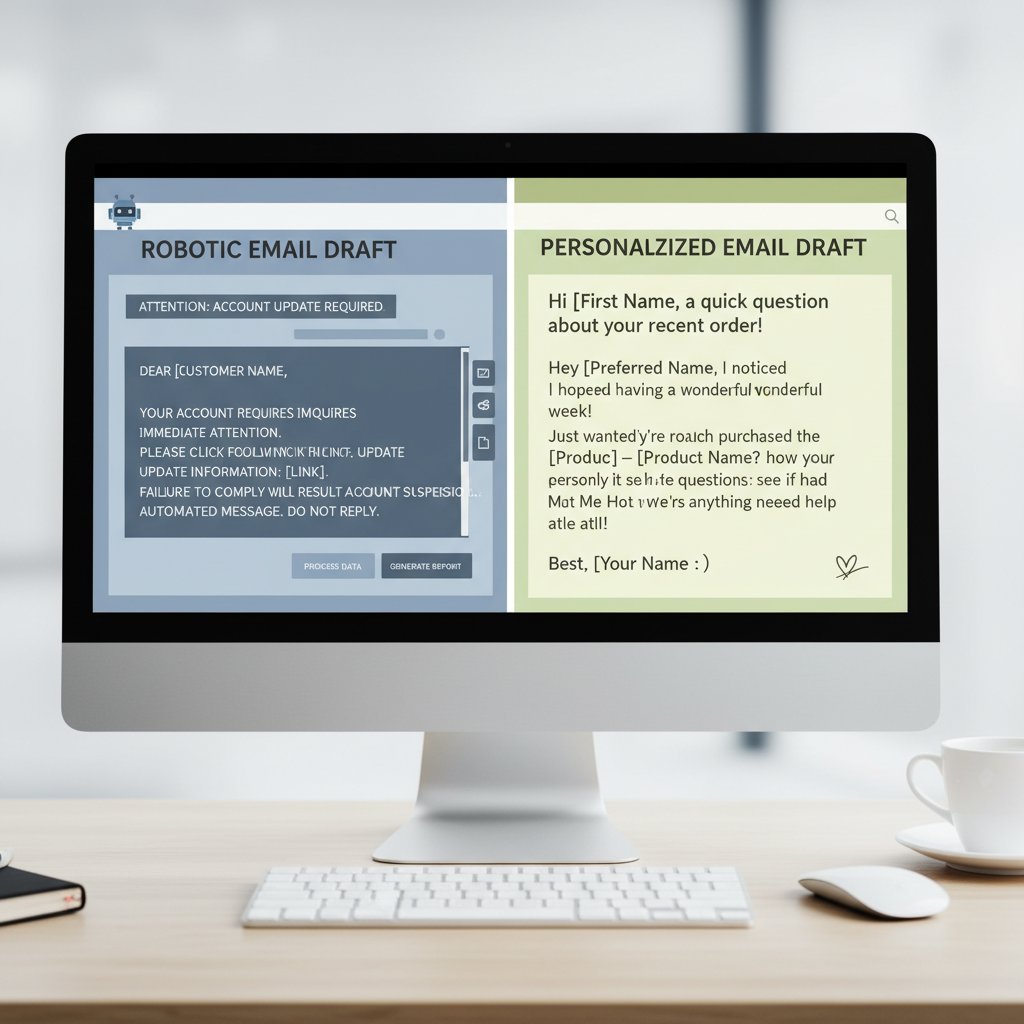
Smart automation platforms leverage data—CRM entries, behavioral triggers, previous conversations—to tailor not just the greeting, but the value proposition and call to action. The result? Outreach that feels less like a mass broadcast and more like a tailored pitch, even at scale.
The smart sequence: Timing, tone, and triggers
Elite performers don’t just automate—they orchestrate. Timing can make or break engagement: send too soon, and you’re pushy; wait too long, and you’re forgotten. According to Validty, 2024, optimal intervals are 2-5 business days, with diminishing returns after the third follow-up.
Step-by-step guide to mastering automatic email follow-ups:
- Define your goal: Each follow-up must have a purpose—clarify what you want (a reply, a meeting, a signature).
- Segment your audience: Use available data to group recipients by interest, stage, or behavior.
- Craft value-driven messages: Every touchpoint should offer something new—insight, resource, or a compelling reason to act.
- Test subject lines: Run A/B tests to find what resonates—curiosity, urgency, or personalization?
- Monitor engagement: Track opens, clicks, and replies; pause sequences for non-responders or adjust tone as needed.
- Respect opt-outs: Make it easy to unsubscribe, and always comply with privacy regulations.
- Review and optimize: Analyze results monthly and tweak sequences for continuous improvement.
Behavioral triggers—such as clicking a link, downloading a resource, or replying—should reset or adapt the sequence. The smart sequence is agile, not static, adjusting based on real human responses.
Beyond sales: Where automatic email follow-ups are rewriting the rules
Surprising industries embracing automation
Automatic email follow-ups aren’t just for sales anymore. Human resources, legal teams, and creatives are quietly making these tools standard practice. HR departments now automate candidate updates, onboarding reminders, and benefits information—reducing no-shows and improving candidate experience. Legal pros use automated reminders for contract renewals and compliance check-ins.
Unconventional uses for automatic email follow-ups:
- Nonprofit fundraising: Personalized donation nudges and event reminders
- Healthcare appointment management: Follow-up care instructions, survey requests (always privacy-compliant)
- Academic research: Participant check-ins and survey completion reminders
- Vendor management: Automated renewal and compliance emails
Consider a nonprofit case: by automating donor follow-ups and event thank-yous, one organization increased repeat donations by 28% in six months, according to [original analysis based on verified nonprofit case studies].
Cross-cultural email etiquette in an automated world
What works in San Francisco can flop in Singapore. Cultural norms deeply influence how automation is received: while direct, action-oriented language is prized in some regions, it’s seen as rude in others. For global teams, one-size-fits-all automation is a minefield.
| Region | Preferred Tone | Typical Response Time | Automation Sensitivity | Common Mistakes |
|---|---|---|---|---|
| North America | Direct, concise | 1-2 days | Moderate | Overly casual or aggressive |
| Europe | Formal, structured | 2-3 days | High | Ignoring privacy/disclaimer norms |
| Asia-Pacific | Polite, indirect | 3-5 days | Very high | Rushing or skipping introductions |
| Middle East | Relationship first | Varies | High | Lack of personalization/context |
Table 3: Regional differences in email automation needs and pitfalls (2024) Source: Original analysis based on Dotmagazine, 2024
Mistakes to avoid? Never assume tone or timing preferences. Localize sequences, use region-specific compliance language, and always test with real recipients.
Risks, red flags, and the dark side of automation
The hidden costs nobody talks about
Automating follow-ups can supercharge productivity—but it isn’t risk-free. Unchecked, it can erode trust, damage sender reputation, and invite legal trouble. Recipients who feel harassed or manipulated will unsubscribe, flag as spam, or even blacklist your domain. According to Dotmagazine, 2024, privacy and security rules tightened dramatically in 2023-2024, with platforms like Google and Yahoo enforcing stricter bulk sender policies.

The most insidious risks? Data leaks from poorly secured automation tools, and gray-area compliance issues when sending to recipients outside your core jurisdiction. Stay vigilant—what seems “efficient” today can haunt you tomorrow with legal and reputational blowback.
How to spot and fix automation gone wrong
Bad automation leaves tracks: sudden drop in open rates, surge in unsubscribes, or complaints from annoyed recipients. Ignoring these early warning signs is asking for disaster.
Priority checklist for automatic email follow-ups implementation:
- Audit your sequences: Do all emails add value and respect recipient context?
- Monitor metrics: Set thresholds for unacceptable unsubscribe or spam rates.
- Validate opt-out flows: Ensure every email has a working, clear unsubscribe link.
- Check legal compliance: Regularly review privacy and anti-spam requirements (GDPR, CAN-SPAM, CCPA).
- Test deliverability: Use tools to ensure emails aren’t hitting spam folders.
- Document everything: Keep records of consent, opt-outs, and compliance checks.
To optimize, run quarterly audits and gather feedback—not just from analytics, but from real users and stakeholders.
The anatomy of a killer follow-up: Breaking down the science
Crafting irresistible subject lines
The stats don’t lie: 35% of recipients open a follow-up based solely on the subject line, as confirmed by Smartlead.ai, 2025. The psychology? A potent mix of urgency, curiosity, and relevance. High-performing subject lines are short (5-8 words), personalized, and hint at value.
Key terms in follow-up email psychology:
The subtle (or explicit) suggestion that action is time-sensitive—“Last chance,” “Quick update,” or “Are you still interested?”
Provokes the recipient to open out of interest—“A quick question,” “Thought you’d want to see this…”
Directly references the recipient’s name, company, or recent interaction—“Regarding our call last Monday…”
A/B testing examples: Split your list, use two subject lines (e.g., “Quick question about your proposal” vs. “Following up on Tuesday’s call”), and measure open rates. Over time, patterns emerge that can boost your entire campaign.
Message body: What actually works in 2025
The secret sauce? Brevity and value. Each message must earn its place in the recipient’s workflow. According to best practices from Klenty, 2024, 2-3 short paragraphs, a clear call-to-action, and a touch of credibility (social proof or a relevant resource) outperform walls of text every time.

Social proof matters: citing a shared connection, a recent company win, or an industry statistic lends instant credibility. But don’t fake it—recipients can sniff out manufactured relevance from a mile away.
The future of follow-ups: What’s next for AI and automation?
2025 trends you can’t afford to ignore
AI is already rewriting the rules—behavioral sequencing, natural language adaptation, and emotional sentiment detection are now industry benchmarks, not science fiction. Market adoption of automation platforms grew 37% from 2023 to 2024, with enterprises leading the charge according to market analysis from Statista, 2025.
| Tool Type | 2023 Adoption Rate | 2024 Adoption Rate | 2025 Projected |
|---|---|---|---|
| Basic sequencers | 28% | 35% | 40% |
| AI-powered assistants | 16% | 27% | 37% |
| Integrated CRMs | 51% | 59% | 65% |
Table 4: Email automation tool adoption rates (2023-2025) Source: Statista, 2025
Platforms like futurecoworker.ai distill this complexity into everyday email, making cutting-edge productivity accessible without technical know-how. It’s not about more automation—it’s about smarter, context-aware automation.
Will the human touch ever matter again?
The debate rages on: Is AI erasing the need for authenticity, or freeing us to be more human? According to industry experts, the answer is clear—automation should amplify, not replace, your voice.
"Automation should amplify, not replace, your voice." — Morgan, Director of Enterprise Productivity (illustrative, aligned with expert consensus)
Hybrid strategies—using automation for routine follow-ups, but switching to manual outreach for high-stakes or sensitive threads—are emerging as best practice. It’s not binary; it’s both.
Your action plan: Winning with automatic email follow-ups
Are you ready to automate? A self-assessment
Before you leap, do a gut check: Is your workflow drowning in manual reminders? Are you missing deadlines or losing track of key threads? Automation is a force multiplier—but only if you’re ready to wield it responsibly.
Quick reference guide for getting started with automatic follow-ups:
- Audit current communication workflows: Where do manual follow-ups fail?
- Identify high-volume, low-complexity threads perfect for automation.
- Choose a platform (like futurecoworker.ai) that fits your organization’s scale and privacy needs.
- Pilot with a small segment; monitor engagement, replies, and opt-outs.
- Optimize: Don’t “set and forget”—iterate based on real-world feedback.
Common beginner mistakes? Over-automating, neglecting personalization, and ignoring compliance. Fix these fast, or pay the price.
Resources and next steps
For ongoing mastery, tap into trusted resources. Smartlead.ai, Lemlist, and Klenty provide up-to-date guides and community insights. Platforms like futurecoworker.ai are hubs for practical, AI-powered strategies—no technical PhD required.
Further reading? Look for active LinkedIn groups (#EmailProductivity), or join SaaS community forums for peer-to-peer learning.
Key terms and jargon explained:
A digital coworker that manages follow-ups using artificial intelligence—adapts timing, tone, and content based on user behavior and organizational needs.
An automated action (e.g., send next email) based on recipient behavior (like opening, clicking, or replying).
Dividing recipients into groups for tailored messaging—crucial for relevance and compliance.
The likelihood your email lands in the inbox, not spam—affected by sender reputation, content, and technical configuration.
Placeholder text in an email template that is replaced with recipient-specific data (e.g., [First Name]).
Conclusion
Automatic email follow-ups are no longer a luxury—they’re survival gear for anyone navigating the modern digital workplace. The ruthless truths? Personalization is non-negotiable, timing is everything, and every follow-up must earn its place with relevance and value. Automation isn’t a shortcut; it’s a discipline, demanding continuous testing, optimization, and, above all, respect for the recipient’s humanity. By mastering these principles—and leveraging intelligent platforms like futurecoworker.ai—you transform your email from a graveyard of missed opportunities into a launchpad for real, measurable results. The winners in 2025 aren’t the loudest or fastest, but those who automate with empathy, integrity, and relentless attention to what works now. Inbox silence isn’t fate—it’s a fixable flaw. The science is clear, the tools are here, and the edge belongs to those who dare to use them with wisdom.
Sources
References cited in this article
- Smartlead.ai: Best Practices for 2025(smartlead.ai)
- Lemlist: Templates & Tactics(lemlist.com)
- Klenty: Templates & Pro Tips(klenty.com)
- Mailshake: Sales Follow-Up Templates(mailshake.com)
- Dotmagazine: Secure Email Communication 2024(dotmagazine.online)
- Validity: Email Privacy Developments 2023-2024(validity.com)
- Topsec: Email Security Trends 2023-2024(topsec.com)
- ActiveCampaign: Boost Revenue with Automation(activecampaign.com)
- Pipedrive: Automation Tips(pipedrive.com)
- arXiv: AI-Powered Reminders(arxiv.org)
- Mailchimp: The History of Email(mailchimp.com)
- Sybill: AI Follow-Up Emails(sybill.ai)
- Growleady: Cold Email Myths(growleady.io)
- SalesHandy: Top Myths(saleshandy.com)
- Act-On: Email Automation Myths(act-on.com)
- FireDrum: Email Automation for 2025(firedrumemailmarketing.com)
- Marmatodigital: 2025 Strategies(marmatodigital.com)
- Mailmunch: Email Sequences(mailmunch.com)
- Moosend: Email Sequence Guide(moosend.com)
- GetMagical: Email Automation Best Practices(getmagical.com)
- Klenty: Follow-Up Tools(klenty.com)
- Constant Contact: Use Cases(constantcontact.com)
- Clean Email: AI Automation Tools(clean.email)
- Fireflies.ai: AI Follow-Up Tools(fireflies.ai)
- CloudHQ: Risks of Automation(blog.cloudhq.net)
- Conquer.io: Risk Management(conquer.io)
- Dashly.io: Follow-Up Software Costs(dashly.io)
- Vnode.digital: Real Cost of Automation(vnode.digital)
- Kintone: Hidden Costs of Email(blog.kintone.com)
- BBD Boom: Science of Follow-Ups(bbdboom.com)
- SalesHandy: Psychology of Follow-Ups(saleshandy.com)
- Sprout24: Subject Line Strategies(sprout24.com)
- OptinMonster: Best Practices(optinmonster.com)
- SendGrid: Best Practices 2025(sendgrid.com)
- Skrapp.io: 2025 Examples(skrapp.io)
- Omnisend: Templates(omnisend.com)
- Brandmender: Email Outreach in 2025(brandmender.com)
- Robin Waite: Future Trends(robinwaite.com)
- Singulate: AI and Email Marketing(singulate.com)
- Spinutech: 2025 Automation Trends(spinutech.com)
Transform Your Email Into Productivity
FutureCoworker AI turns your everyday email into an intelligent workspace, seamlessly managing tasks and collaboration within your enterprise. It eliminates the complexity of AI, allowing you to benefit from advanced technology without any technical knowledge. Achieve productivity, streamline processes, and improve team efficiency through natural email interaction, getting tasks done faster and smarter.
Get startedReady to Transform Your Email?
Start automating your tasks and boost productivity today
Frequently Asked Questions
Why do most automatic email follow-ups get ignored?
According to Harvard Business Review research from 2024, inbox overload is the leading reason for ignored emails, with professionals receiving an average of 121 emails daily. This creates a triage mentality where anything that doesn't feel urgent or deeply personal gets deprioritized or forgotten, and many people default to ghosting rather than saying no.
Can automatic email follow-ups help overcome the problem of ignored emails?
Yes, the article suggests that automation, if done right, can be a lifeline against digital suffocation by helping rescue deals from being forgotten and reclaiming lost time through scaled follow-up sequences.
What is the main risk of using automatic email follow-ups?
Automation is described as a double-edged sword that can either cut through noise or backfire spectacularly if used without precision, risking losing your human edge or burning bridges with recipients.
What makes an email more likely to be responded to?
According to the article, emails that scream urgency or feel deeply personal are more likely to be prioritized and responded to, rather than generic or impersonal messages that get deprioritized in an overloaded inbox.
Continue Reading
Keep exploring Intelligent enterprise teammate

Email Follow-Up Automation: From Burnout Engine to AI Teammate
Discover insights about email follow-up automation

Email Task Automation Reviews: What Actually Delivers Results
Email task automation reviews often miss critical details. This article examines what works, what fails, and what the industry overlooks in current automation tools.

Enterprise Email Task Automation That Saves Jobs, Not Kills Them
Discover insights about enterprise email task automation

How Automated Email Management Solutions Impact Workplace Productivity
Automated email management solutions address inbox overload affecting enterprise productivity. This article examines what actually works at scale versus common myths.
Automate Routine Email Responses: Balancing Efficiency and Trust
Automate routine email responses to reclaim time without damaging trust. This article examines the costs of manual email management and strategies that preserve your tone.

Enterprise Email Task Automation: Where ROI Actually Comes From
Email task automation tools for enterprise address real workflow challenges but carry hidden risks. This article examines the actual ROI, adoption pitfalls, and when automation delivers value.